Valentines Lined Journal - KDP Interior: Streamlining Your Publishing Workflow
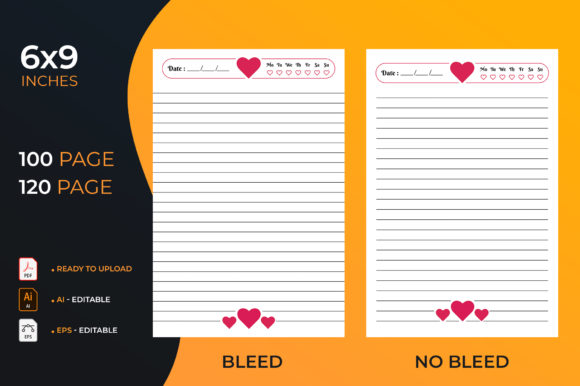
Building a sustainable Amazon KDP business requires balancing creative appeal with technical precision. For publishers targeting the seasonal romance market, the Valentines Lined Journal - KDP Interior offers a practical solution to bridge that gap. This resource is designed specifically to help creators build their publishing portfolio easier and faster across an unlimited number of niches. Rather than spending hours formatting margins or troubleshooting bleed settings, this pre-formatted interior allows you to focus on cover design and keyword strategy. With 100 pages formatted and tested for upload, it serves as a reliable foundation for low-content books that meet Amazon’s strict printing standards.
However, having a high-quality file is only half the battle. Many publishers, from beginners to seasoned freelancers, encounter friction not because the product is flawed, but because they misunderstand how to integrate it into their workflow. Understanding the specific features and common pitfalls associated with this lined journal interior can save you from rejected manuscripts, wasted ad spend, and poor customer reviews.
Common Misunderstandings About Bleed and Margin Settings
One of the most frequent errors when using any pre-made KDP interior is assuming that "ready for upload" means "no configuration required." While this Valentines Lined Journal includes settings for both bleed and no-bleed options, selecting the wrong one during the KDP setup process will result in immediate rejection or a distorted print.
A no-bleed setting keeps all content within a safe margin, which is standard for lined journals where lines should not run off the edge of the page. Conversely, if your cover design extends to the trim line, you must select bleed settings for the cover while potentially keeping the interior as no-bleed. Confusion arises when publishers apply bleed settings to the interior file unnecessarily, causing the platform to resize the PDF and shift the lining. Before uploading, always verify whether your specific project requires the interior to extend beyond the trim line. For a standard 6x9 lined journal, the no-bleed interior option is typically the correct choice to maintain crisp, centered lines.
Verifying Dimensions Before Customization
This interior is strictly formatted for 6x9 inches. A costly mistake occurs when creators attempt to resize this PDF to fit other trim sizes like 5x8 or 8.5x11 using basic PDF viewers. Resizing a formatted journal distorts the line spacing and margin ratios, often making the writing space unusable. If you need a different size, you should utilize the included editable source files rather than stretching the final PDF. Always confirm your intended trim size matches the 6x9 specification before beginning any cover design work to ensure the spine width calculation aligns with the 100 or 120-page count.
Leveraging Editable Source Files Correctly
The package includes significant value beyond the ready-to-print PDFs: 4 AI Illustrator CC editable files, 4 EPS files, and single paper JPGs. Many users overlook these assets, treating the product as a static template. This limits scalability and branding potential.
- Brand Consistency: Use the AI or EPS files to add subtle watermarks, custom headers, or niche-specific prompts. This transforms a generic Valentine’s journal into a specialized product for teachers, nurses, or new mothers.
- Error Correction: If you spot a layout preference you wish to adjust, editing the vector source file preserves quality. Rasterizing or editing a flattened PDF leads to pixelation.
- Cross-Niche Adaptation: The editable files allow you to remove holiday-specific elements easily, repurposing the lined structure for non-seasonal niches throughout the year.
Failing to use these source files means missing the opportunity to differentiate your book in a saturated market. Simply uploading the stock PDF without modification increases the likelihood of duplicate content flags and reduces perceived value for the buyer.
File Format Selection and Upload Integrity
With multiple file types included (PDF, AI, EPS, JPG), choosing the wrong format for production is a common efficiency killer. Only the high-resolution PDF files should be uploaded to Amazon KDP for the interior. The JPG and EPS files are reference or editing assets, not print-ready interiors. Uploading a JPG as a book interior will result in catastrophic quality issues, including blurry text and incorrect margins. Always export your final edits from Illustrator as a high-quality PDF with embedded fonts and preserved vector data to ensure the "tested for upload" guarantee remains valid.
Strategic Considerations for Seasonal vs. Evergreen Content
While marketed as a Valentines Lined Journal, smart publishers evaluate this asset through an evergreen lens. A common strategic error is relying solely on the Valentine's aesthetic, which creates a short sales window. To maximize return on investment, consider how the underlying structure supports long-term sales.
The lined format itself is evergreen. By utilizing the editable files to swap out heart motifs for floral patterns, geometric shapes, or minimalist borders, you extend the product's lifecycle significantly. Additionally, ensure your metadata reflects this versatility. If you only tag the book for Valentine's Day, you miss traffic from buyers searching for "cute pink journal" or "romantic diary" in July. Practical advice here is to create multiple versions: one strictly for the holiday season and others stripped of date-specific imagery for year-round relevance.
Quality Control Checklist Before Publishing
Even with a professionally formatted interior, you must perform due diligence. Before hitting publish, run through this verification list to protect your account health and customer satisfaction:
- Download the Digital Proof: Never skip the online proofer. Check the first and last pages specifically, as binding margins can sometimes appear tighter than expected in digital previews.
- Verify Page Count Alignment: Ensure your cover spine calculation matches the exact page count of the interior file you selected (100 vs. 120 pages). A mismatch here causes cover wrap-around errors.
- Check Line Darkness: Print a physical test copy if possible. Screen brightness can be deceiving; ensure the lines are dark enough to see but light enough to write over without smudging.
- Review Metadata Relevance: Confirm that your title and subtitle accurately describe the interior. Misleading customers by promising "prompts" when the interior is strictly lined leads to negative reviews.
Making Informed Decisions for Your KDP Business
The Valentines Lined Journal - KDP Interior is a tool designed to reduce technical barriers, but it requires informed application. Success comes from understanding the distinction between a ready-made file and a finished product. By respecting the technical specifications regarding bleed and dimensions, utilizing the editable source files for customization, and planning for both seasonal and evergreen sales cycles, you transform a simple template into a scalable business asset.
Ultimately, the goal is to publish with confidence. When you understand what to check and how to avoid common formatting and strategic mistakes, you spend less time fixing errors and more time growing your catalog. Whether you are a hobbyist creating gifts or an entrepreneur building a brand, treating this interior with professional rigor ensures your final product meets the expectations of both the platform and your readers.