Strategic Planning with the Desk 2021 Calendar Template
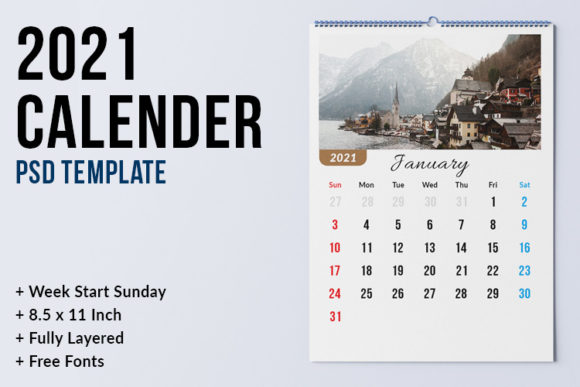
Effective time management requires more than simply tracking dates; it demands a visual framework that aligns daily actions with broader strategic objectives. The Desk 2021 Calendar Template serves as this foundational tool for professionals, entrepreneurs, and creatives who understand that organization is a precursor to achievement. Unlike generic digital calendars that disappear into the background of a device, a dedicated desk calendar template provides a tangible or printable interface for intentional planning. This specific resource is designed not merely as a date tracker, but as a customizable operational dashboard that supports goal setting, project visualization, and consistent productivity habits throughout the year.
For decision-makers and freelancers operating in high-velocity environments, the ability to modify and adapt planning tools is critical. This template offers the flexibility required to tailor time management systems to specific workflows rather than forcing complex projects into rigid, pre-formatted boxes. By leveraging high-resolution, editable assets, users can transform a standard calendar into a personalized command center. This shift from passive scheduling to active strategic design is what separates busy professionals from effective leaders. The utility of this asset lies in its capacity to bridge the gap between abstract annual goals and concrete monthly execution.
Technical Specifications for Professional Customization
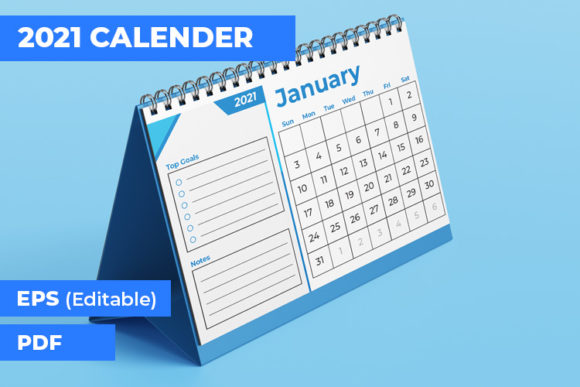
To utilize the Desk 2021 Calendar Template effectively, one must understand the technical parameters that ensure professional-grade output. This is an instant download digital product, meaning there is no physical shipment; the value is derived entirely from the user's ability to manipulate the source files. The package includes 13 EPS files and a single PDF file containing 12 pages. These specifications are deliberate, catering to users who require print-ready quality or high-fidelity digital integration.
- File Format: EPS (Encapsulated PostScript) allows for infinite scalability without loss of quality, essential for resizing from A5 Landscape to larger desk formats or digital banners.
- Resolution and Color: Files are set at 300 DPI in CMYK color mode. This ensures that if you choose to print the calendar for physical desk use, the text remains crisp and colors reproduce accurately on commercial or home printers.
- Dimensions: The native size is A5 Landscape, a compact yet functional dimension that occupies minimal desk real estate while providing sufficient space for annotations and goal tracking.
- Bleed Settings: A 0.25-inch bleed is included. For those sending this to a professional print shop, this margin prevents white edges after trimming, ensuring a polished, retail-quality finish.
- Software Compatibility: Modification requires Adobe Illustrator CS6 or later. This industry-standard vector software enables full control over typography, layout grids, and color palettes.
Understanding these technical details prevents frustration during the customization phase. Users should note that mockups are not included, and fonts used in the preview may need to be verified via the included README.txt file. This transparency ensures that creators can plan their asset acquisition and setup time efficiently before diving into the strategic planning process.
Aligning Visual Planning with Strategic Goals
The primary advantage of using an editable Desk 2021 Calendar Template over a pre-printed alternative is the opportunity to embed strategy directly into the planning surface. When you have access to the source EPS files, the calendar becomes a reflection of your priorities. Entrepreneurs and marketers can color-code months based on campaign phases, product launches, or fiscal quarters. Educators and content creators can visually map out curriculum development or content pipelines, creating a macro-view that prevents bottlenecks before they occur.
Consider the cognitive load associated with switching between digital task managers and physical reference points. A customized desk calendar reduces this friction by serving as a persistent visual anchor. When you modify the template to include specific sections for "Key Results," "Weekly Focus," or "Learning Objectives," you are engineering your environment to reinforce your goals. This is environmental design applied to productivity. Instead of reacting to incoming requests, the calendar prompts proactive behavior aligned with long-term outcomes.
For small business owners, this template can also serve as a branding touchpoint. By incorporating company colors, logos, or motivational messaging consistent with organizational values, the calendar reinforces culture and identity. It transforms a utilitarian object into a communication tool that signals professionalism and intentionality to clients or team members who visit your workspace. This dual function—operational utility and brand reinforcement—maximizes the return on the time invested in customization.
Practical Workflows for Time Management and Execution
Owning the template is only the first step; extracting value requires a disciplined approach to implementation. The following workflows demonstrate how to leverage the Desk 2021 Calendar Template for tangible results across different professional contexts.
Quarterly Sprint Planning
Rather than viewing the year as twelve identical months, use the EPS files to group pages into quarterly sprints. Modify the header or sidebar areas to reflect the specific theme or major objective for that quarter. This visual segmentation helps prevent the "mid-year slump" by breaking the annual marathon into manageable, focused segments. Freelancers can use this to balance client work with internal business development, ensuring neither is neglected over long stretches.
Content and Campaign Mapping
Marketers and bloggers can repurpose the landscape layout as a Gantt-style overview. Use Adobe Illustrator to create horizontal bars spanning multiple days or weeks to visualize campaign durations. This high-level view complements detailed editorial calendars by showing overlaps and resource constraints. Seeing three major launches clustered in a single month on a physical desk calendar often reveals scheduling conflicts that spreadsheet views obscure.
Habit Stacking and Accountability
For personal development or skill acquisition, customize the daily grid spaces to include habit trackers. Because the file is vector-based, you can add checkboxes, progress bars, or rating scales directly to the template. Printing this modified version creates an accountability system that exists outside of distracting digital ecosystems. The act of physically marking progress engages different neural pathways than clicking a mouse, reinforcing commitment through tactile interaction.
Risks of Unintentional Planning and How to Avoid Them
While the Desk 2021 Calendar Template is a powerful asset, it carries risks if approached without clarity. The most common pitfall is aesthetic prioritization over functional utility. Spending excessive hours perfecting gradients or font pairings while neglecting to define actual goals renders the tool decorative rather than operational. Before opening Adobe Illustrator, define exactly what information needs to be tracked and what decisions the calendar should support. Form must follow function.
Another risk is over-customization leading to analysis paralysis. With full editability comes the temptation to redesign the system every month. This constant tweaking consumes time that should be spent executing. Establish a standardized template master file early in the year and adhere to it. Consistency builds familiarity, and familiarity reduces the cognitive effort required to use the tool. Only deviate from the established system if current workflows are demonstrably failing to produce results.
Finally, avoid the disconnect between digital and physical planning. If your primary task management occurs in software like Asana or Trello, ensure your customized desk calendar mirrors or complements that system rather than contradicting it. The desk calendar should serve as the strategic compass, while digital tools handle tactical navigation. Using them in opposition creates confusion and erodes trust in your own planning system. Intentional integration is key to sustainable productivity.
Maximizing Long-Term Value Beyond the Current Year
Although labeled as a 2021 resource, the structural design and layout principles of this Desk 2021 Calendar Template offer enduring value. The EPS files represent a reusable framework for future planning. Once you have customized the master layout to fit your specific workflow, updating dates for subsequent years becomes a trivial task. This creates a proprietary planning system that evolves with your career or business, accumulating institutional knowledge and personal preferences over time.
Furthermore, the skills developed through modifying these files—layout hierarchy, information density management, and visual communication—are transferable. Professionals who learn to structure temporal information visually become better at presenting roadmaps to stakeholders, designing project timelines, and communicating complex schedules. The template is essentially a training ground for strategic visualization.
When utilizing this instant download, remember that it is an information-only digital file. Success depends entirely on your input. Approach the customization process with the same rigor you apply to your core business activities. Define your parameters, respect the technical constraints of CMYK and bleed settings, and focus relentlessly on how each design choice supports your ultimate objectives. By treating the Desk 2021 Calendar Template as a strategic instrument rather than a mere stationery item, you convert a simple organizational tool into a catalyst for sustained performance and achievement.