Evaluating the KDP Recipes Journal Interior for Self-Publishing
Creating a functional and aesthetically pleasing cookbook requires more than just culinary expertise; it demands a structured layout that guides the reader through the cooking process without friction. For self-publishers, food bloggers, and entrepreneurs looking to monetize their recipe collections on Amazon KDP, the interior file is often the most significant bottleneck. The KDP Recipes Journal Interior addresses this specific production challenge by providing a pre-formatted template designed for 8.5 x 11 inch publications. Rather than spending dozens of hours designing grids, measurement conversions, and note sections from scratch, creators can utilize this resource to focus on content curation and audience building.
This journal interior is positioned as a utility asset for low-content and medium-content publishing. It serves as a foundational skeleton for anyone intending to publish original recipes, whether for commercial sale, lead generation, or personal archival. Understanding the practical application, technical specifications, and strategic value of this template is essential for determining if it aligns with your current publishing workflow and business objectives.
Technical Specifications and File Utility
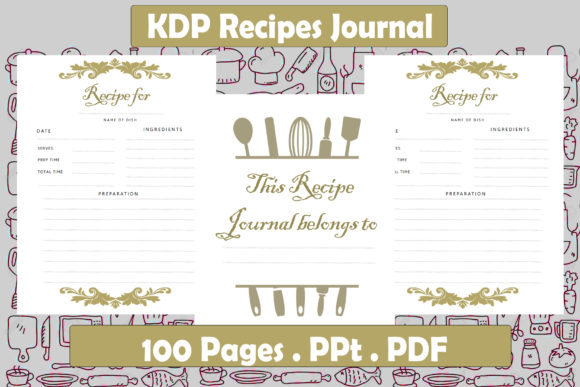
The product includes two distinct file formats: a PowerPoint (PPT) file and a PDF. This dual-format approach offers significant flexibility for different types of users. The PDF serves as a print-ready proof, allowing publishers to verify margins, bleed settings, and overall visual balance before uploading to KDP. However, the editable PowerPoint file is where the primary value lies for serious creators. Unlike static PDF templates that require expensive graphic design software like Adobe InDesign to modify, a PPT file lowers the barrier to entry. Users can adjust fonts, reposition elements, add branding logos, or customize section headers using software they likely already own.
The dimensions are set to the industry-standard 8.5 x 11 inches. This trim size is optimal for cookbooks and recipe journals because it provides ample surface area for complex instructions, ingredient lists, and photography without feeling cramped. Smaller sizes, such as 6x9, often force awkward line breaks in ingredient lists or reduce font sizes to unreadable levels. The 162-page count is another deliberate specification. It strikes a balance between perceived value and printing costs. On Amazon KDP, page count directly influences royalty calculations and minimum list prices. A 162-page book allows for a competitive price point while maintaining a spine width substantial enough to display text clearly on a bookshelf, which is a critical factor for physical retail visibility and consumer perception of quality.
Layout Architecture and User Experience
A recipe journal lives or dies by its usability. If a cook cannot quickly parse ingredients or track modifications while standing at a stove, the book has failed its primary function. This interior template typically incorporates standard culinary organization hierarchies. Key elements usually include dedicated fields for prep time, cook time, total time, serving size, and nutritional information. These structured data points are not merely decorative; they are essential for searchability and user reference. When creating a cookbook, consistency in these fields builds trust with the reader.
Furthermore, effective recipe journals include space for personalization. Sections for "Notes," "Modifications," or "Rating" transform a static list of instructions into an interactive tool. For KDP publishers targeting the gift market or the home-cook niche, these interactive elements increase the product's utility. The layout also generally accounts for gutter margins—the inner margin where pages meet the binding. Neglecting gutter safety zones is a common error in amateur KDP interiors that results in text disappearing into the spine. A professionally designed interior like this one pre-calculates these safe zones, reducing the risk of rejection during the KDP review process and ensuring a professional final product.
Strategic Applications for Creators and Marketers
While the obvious use case is publishing a standalone cookbook, the KDP Recipes Journal Interior serves multiple strategic functions for digital entrepreneurs and content creators. For food bloggers and influencers, this template facilitates the creation of "lead magnets." By compiling top-performing recipes into a polished, downloadable PDF or a low-cost physical book, creators can drive email list signups or offer a tangible thank-you to patrons. The professional formatting signals authority and care, distinguishing the brand from competitors who simply copy-paste blog posts into unformatted documents.
Educators and culinary instructors can also leverage this asset. Creating course materials or student workbooks requires consistent formatting to ensure clarity. Using a pre-made interior saves administrative time, allowing instructors to focus on curriculum development rather than document design. Similarly, small business owners in the food space, such as caterers or private chefs, can use this journal to create branded client gifts or internal standard operating procedure (SOP) manuals. The ability to edit the PowerPoint file means adding a company logo or adjusting color schemes to match brand guidelines is straightforward, making the template a versatile business tool beyond simple self-publishing.
Assessing Quality and Customization Limits
When evaluating any KDP template, one must assess the balance between convenience and uniqueness. The strength of this KDP Recipes Journal Interior is its adherence to publishing standards and immediate usability. It eliminates technical guesswork regarding margins and bleed. However, users should be aware of the inherent limitations of template-based publishing. Because this is a pre-designed asset, other publishers may be using the identical layout. To mitigate this, customization is mandatory. Relying on the default fonts and exact placement will result in a generic product that struggles to stand out in a saturated marketplace.
Publishers should treat this interior as a starting point, not a finished product. Changing typefaces, adjusting header styles, and inserting unique dividers or illustrations are necessary steps to establish intellectual property and brand identity. Additionally, while PowerPoint is accessible, it is not a professional typesetting tool. Users may encounter minor alignment issues or font embedding warnings when exporting back to PDF. It is advisable to perform rigorous quality checks on the exported PDF, specifically zooming in to 100% to verify text crispness and checking grayscale previews to ensure images have sufficient contrast for black-and-white printing if that is the chosen format.
Workflow Integration and Production Efficiency
For freelancers and virtual assistants offering book formatting services, this interior acts as a force multiplier. Instead of billing clients for twenty hours of custom layout design, professionals can license or utilize this template to deliver high-quality interiors in a fraction of the time. This efficiency improves profit margins and allows for faster turnaround times. The key is transparency; clients should understand they are receiving a customized template rather than bespoke design, but for many recipe books, the standardized structure is actually preferable to experimental layouts.
The production workflow with this asset typically follows a linear path: import the PPT, replace placeholder text with verified recipes, adjust global styles for branding, export to PDF, and validate using the KDP Previewer. This streamlined process reduces cognitive load. Writers can focus entirely on recipe testing and headnote writing, knowing the visual container is already secure. For those managing multiple titles in a series, the template ensures visual consistency across volumes, which is crucial for series recognition and cross-selling.
Determining Fit for Your Publishing Goals
Is the KDP Recipes Journal Interior the right choice for your project? The answer depends on your priorities regarding time, budget, and design capability. If you are a professional designer with a unique vision for a high-end art cookbook, this template may feel restrictive. Custom design would better serve avant-garde projects. However, for the vast majority of functional cookbooks, family heritage archives, niche diet guides, and promotional recipe collections, this interior offers an exceptional return on investment.
It is particularly well-suited for:
- First-time publishers who lack design experience and need a guaranteed-safe layout.
- Niche experts whose value proposition is the information itself, not the graphic design.
- Marketers needing rapid deployment of physical assets for campaigns.
- Families preserving oral traditions who want a clean, readable format without hiring a formatter.
Ultimately, the success of a recipe book relies on the reliability of the content and the ease of the user experience. This journal interior secures the latter, providing a robust, standard-compliant vessel for your culinary knowledge. By removing technical friction, it allows creators to direct their energy toward what truly matters: sharing memorable recipes and providing genuine value to their readers. Whether used for commercial publishing or personal legacy preservation, it represents a practical, efficient solution in the modern self-publishing ecosystem.