Blank Music Manuscript - KDP Interior: Streamlining Your Publishing Workflow
Building a sustainable low-content publishing business on Amazon requires more than just uploading generic files; it demands precision, quality, and efficiency. For creators targeting musicians, students, and composers, a Blank Music Manuscript - KDP Interior serves as a foundational product. However, the difference between a book that sells and one that gets rejected or receives poor reviews often lies in technical specifications and usability. This specific interior template is designed to eliminate the guesswork, offering 100 formatted pages tested specifically for Amazon’s printing requirements. By utilizing a pre-validated resource, publishers can bypass the tedious trial-and-error phase of layout design and focus instead on niche research, keyword optimization, and marketing.
Common Technical Oversights in Music Manuscript Layouts
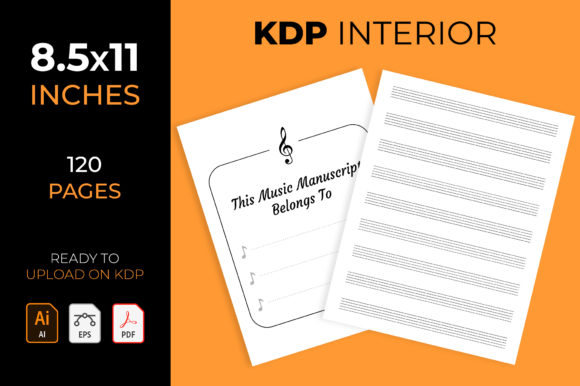
One of the most frequent mistakes new KDP publishers make is misunderstanding bleed settings. Music manuscripts are unique because they often require precise margins to ensure staves do not get cut off during the trimming process. Many beginners attempt to create these interiors from scratch without fully grasping the relationship between trim size and safe zones. This particular manuscript template is configured with No Bleed settings at 8.5×11 inches, which is the industry standard for sheet music and composition notebooks. Using a file with incorrect bleed parameters can result in Amazon rejecting your upload or, worse, approving a book where the outer staff lines are truncated.
Another critical error involves line weight and spacing consistency. When sourcing free or low-quality templates, you may encounter staves that are too faint to print clearly or too thick to write over comfortably. Professional musicians and educators are discerning customers; if the paper quality or printing appears amateurish due to poor vector resolution, they will leave negative feedback. This Blank Music Manuscript - KDP Interior addresses this by providing three distinct staff sizes: Large, Medium, and Small. This variety is not merely an aesthetic choice but a functional necessity. Large staves are essential for early childhood music education, while medium and small staves cater to adult composers and instrumentalists who need more measures per page. Failing to offer appropriate sizing options limits your potential audience significantly.
The Importance of Double-Sided Formatting
A surprisingly common oversight in low-content book creation is neglecting double-sided formatting. Music is inherently linear, and composers rarely stop writing at the bottom of a right-hand page only to restart at the top of the next right-hand page. A usable manuscript must support continuous notation across facing pages. Some generic templates only place staves on odd-numbered pages or fail to account for gutter margins properly, making the book frustrating to use. This interior is explicitly typed for music manuscript on both sides, ensuring that when the book is opened flat, the writing experience is seamless. Before finalizing any interior, always download a proof copy or use the KDP Previewer to check how the gutter margin affects readability near the spine.
Evaluating File Formats and Editability
Many publishers purchase KDP interiors without considering future customization needs. Relying solely on a flattened PDF restricts your ability to differentiate your products in a saturated market. While having 3 Ready For Upload To Amazon KDP PDF Files is convenient for immediate publishing, long-term success requires adaptability. This package includes editable source files in AI Illustrator CC and EPS formats. This distinction is vital for correcting issues or rebranding.
Consider a scenario where you want to add a specific title page, adjust the header font to match a series brand, or modify the staff spacing for a specialized instrument like tablature. Without editable vector files, you would have to recreate the entire interior from scratch. With the included AI and EPS files, these adjustments take minutes rather than hours. A practical warning here: ensure you have compatible software before purchasing editable assets. Adobe Illustrator is the industry standard, but if you lack access, verify if alternative vector editors can open the EPS files correctly. Do not assume all "editable" claims are universally compatible across every graphic design platform.
Checking Page Count and Production Costs
Efficiency in KDP publishing also means understanding the relationship between page count and printing costs. This manuscript contains 120 pages, a strategic length that balances perceived value with production expenses. Beginners sometimes create books that are too thin (under 80 pages), which prevents text from appearing on the spine, or excessively thick, which drives up printing costs and eats into royalties. At 120 pages, this Blank Music Manuscript - KDP Interior hits a sweet spot for standard paperback pricing. Always run the numbers through the KDP Royalty Calculator before publishing. A beautiful interior is useless if the minimum printing cost forces you to price the book above market tolerance.
Practical Steps for Implementation and Quality Assurance
To maximize the utility of this interior, follow a structured validation process rather than assuming the files are flawless for every single project. Even tested templates should be verified against current KDP guidelines, as platform requirements can change.
- Verify Metadata Alignment: Ensure your book description accurately reflects the staff size included. If you are using the Large Stave version, explicitly state "Large Staff Music Paper" in your title and subtitle to avoid customer confusion.
- Test Print Locally: Before ordering an author copy, print a few pages on your home printer at 100% scale. Measure the distance between staff lines with a ruler. This physical check confirms that the digital dimensions translate correctly to paper.
- Inspect Gutter Margins: Open the PDF in the KDP Previewer and navigate to the center of the book. Confirm that the inner margin provides enough white space so users do not have to break the spine to write near the binding.
- Customize the First Page: Use the editable files to add a "This Book Belongs To" page or a chord reference chart. These small additions increase perceived value and distinguish your listing from competitors using identical base templates.
Avoiding Market Saturation Through Customization
While this Blank Music Manuscript - KDP Interior provides a professional foundation, relying on it without modification can lead to visibility issues. Amazon’s algorithm favors unique content. Use the provided editable files to create variations. Change the cover design entirely, add instructional content on the first few pages, or bundle different staff sizes into a single comprehensive volume. The goal is to leverage the technical accuracy of the pre-formatted interior while applying your own creative strategy to the exterior and supplementary content.
Ultimately, the value of this resource lies in its reliability. It removes the technical barriers that cause many aspiring publishers to quit. By starting with a 100-page, no-bleed, double-sided manuscript that includes editable vectors, you secure a professional baseline. This allows you to redirect energy toward building a cohesive brand and serving your audience effectively. Remember that tools facilitate the process, but your attention to detail and commitment to user experience determine the final outcome. Treat this interior not as a finished product, but as a high-quality component in a broader publishing strategy focused on solving real problems for musicians and students.