Projects and Clients Organizer Notebook: Streamlining Workflow for Creative Professionals
Chaos is the silent killer of freelance careers and small businesses. When you are juggling multiple clients, overlapping deadlines, and creative deliverables, relying solely on digital apps or scattered sticky notes often leads to missed details and billing errors. The Projects and Clients Organizer Notebook serves as a dedicated physical command center designed specifically to bridge the gap between creative flow and administrative rigor. Unlike generic planners that focus only on time management, this tool focuses on project lifecycle management, ensuring that every client interaction, payment status, and creative sketch has a designated home.
Bridging the Gap Between Creativity and Administration
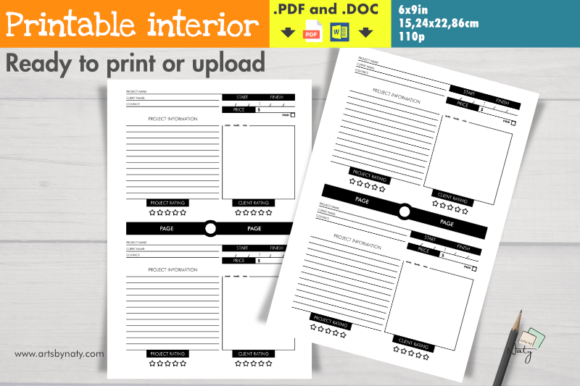
For many entrepreneurs, the mental load of remembering whether an invoice was sent or if a client approved a specific color palette is exhausting. This printable notebook interior addresses that cognitive friction by providing a structured yet flexible layout. With space for two projects per page, it allows for high-density organization without feeling cluttered. The inclusion of specific fields for start and finish dates, pricing, and a "paid" checkbox transforms a simple notebook into a financial tracking tool. This is particularly vital for those who find themselves constantly switching between right-brain creative tasks and left-brain logistical planning.
The design acknowledges that business isn't always linear. By including dedicated space for sketches, doodles, or quick notes directly alongside client contact info and project specs, it keeps context intact. You no longer have to flip between a sketchbook and a ledger; the visual idea and the business parameters exist on the same spread. This proximity helps maintain momentum, reducing the time spent searching for information and increasing the time spent executing work.
Real-World Applications Across Diverse Industries
While the term "organizer" might suggest corporate rigidity, the Projects and Clients Organizer Notebook is remarkably adaptable to hands-on and creative professions. Different industries utilize these layouts to solve unique pain points inherent to their workflows.
Visual Artists and Tattoo Professionals
For tattoo artists and illustrators, the consultation phase is just as important as the execution. During a consult, capturing the client’s vision requires active listening and visual note-taking. The sketch area in this organizer allows artists to draw rough concepts while simultaneously recording the appointment date, deposit amount, and specific design references. Instead of losing ideas on loose paper that gets separated from the booking calendar, the entire client profile remains unified. The rating system also helps artists track which clients were easiest to work with, informing future booking decisions.
Social Media Managers and Content Creators
Social media managers often handle five to ten accounts simultaneously, each with distinct brand voices and content calendars. Digital tools are great for scheduling, but they are poor for high-level strategy brainstorming. Using this notebook, managers can dedicate spreads to individual campaigns. They can jot down hashtag strategies, influencer outreach lists, and KPI targets next to the client’s retainer fee. The alphabetical or page-number indexing feature is a game-changer here, allowing managers to quickly flip to a specific client’s ongoing campaign notes during a Zoom call without fumbling through tabs or loading screens.
Home-Based Culinary Businesses and Crafters
Entrepreneurs running home cooking businesses or selling handmade crafts face unique inventory and custom order challenges. A custom cake order, for example, involves flavor profiles, allergy restrictions, delivery logistics, and payment schedules. Writing these details in a text message thread is a recipe for disaster. This organizer provides a professional framework for what is often a casual home business. Tracking the "paid" status ensures that ingredients aren't purchased for orders that haven't been secured financially, protecting thin profit margins common in early-stage food businesses.
Developers and Online Coaches
Even in intangible service industries, scope creep is a major issue. For developers building websites or coaches creating course curriculums, defining the "finish line" is critical. The dedicated project information space allows these professionals to write down the exact scope agreed upon at the start. When a client asks for "just one more small tweak," referring back to the original written scope in the notebook provides an objective basis for discussing change orders or additional fees. It acts as a physical contract reminder that protects the freelancer's time.
Strategic Considerations Before Implementation
Adopting a new organizational system requires intention. Before printing or uploading this 6x9in (15.24 x 22.86 cm) interior to KDP, consider how it fits into your existing ecosystem. This notebook is not intended to replace your accounting software or your digital calendar; rather, it complements them. It functions best as a capture tool and a daily reference guide.
Size and Portability: The 6x9 inch format is deliberate. It is large enough to write legibly and sketch comfortably but small enough to fit in a standard bag or sit unobtrusively on a crowded desk. If you primarily work at a fixed station and require massive spreads for complex diagrams, you might find this size limiting. However, for mobile freelancers who meet clients in coffee shops or co-working spaces, this form factor offers the perfect balance of utility and portability.
Digital vs. Analog Hybrid: Many successful users employ a hybrid method. They use the Projects and Clients Organizer Notebook for active project management, brainstorming, and client meetings because writing by hand improves memory retention and engagement. Once a project is completed and paid, the final data is migrated to digital archives for long-term storage and tax purposes. Understanding this workflow prevents the frustration of trying to make a physical notebook do the job of a cloud database.
Maximizing Utility Through Customization
One of the most effective strategies for using this printable interior is color-coding. Because the layout accommodates two projects per page, visual differentiation helps prevent cross-contamination of ideas. Using colored sticky markers or highlighters to denote priority levels, project phases, or client tiers allows for instant visual scanning. A red tab might indicate urgent deadlines, while green could signify completed and paid projects. This tactile interaction adds a layer of organization that purely digital lists cannot replicate.
The inclusion of both PDF and DOC files offers significant flexibility for those who wish to customize the interior before printing. While the timeless design works out of the box, some niche businesses may want to adjust field labels. A photographer might rename "Project Name" to "Session Type," while a writer might change it to "Article Title." Having access to the source file ensures the tool adapts to the user, rather than forcing the user to adapt to the tool.
Evaluating Strengths and Limitations
No single tool solves every problem, and it is helpful to approach this organizer with realistic expectations. Its primary strength lies in its simplicity and focus. By stripping away non-essential planner elements like hourly schedules or habit trackers, it forces the user to concentrate strictly on project deliverables and client relationships. The 110-page count provides substantial longevity without becoming unwieldy, typically lasting several months for active freelancers.
However, users should be aware of the limitations regarding searchability. Unlike digital tools, you cannot Ctrl+F a physical notebook. This makes the Table of Contents and the dedicated index space absolutely critical. Users must commit to maintaining the index; otherwise, the notebook becomes a chronological archive that is difficult to navigate retrospectively. Additionally, while the "paid" checkbox is excellent for quick status checks, it does not calculate totals. Users must still reconcile their notebook records with bank statements regularly.
Ultimately, the Projects and Clients Organizer Notebook is a foundational tool for professionals who value clarity over complexity. Whether used as a standalone system for simpler businesses or as a tactical companion to digital suites for larger operations, it brings a necessary level of mindfulness to project management. For KDP creators, offering this specific, niche-focused interior meets a genuine market need for tangible organization in an increasingly digital world. For end-users, it represents a commitment to treating their creative work with the professional respect it deserves.